 Ride & Write
The driving log that
does not record for you
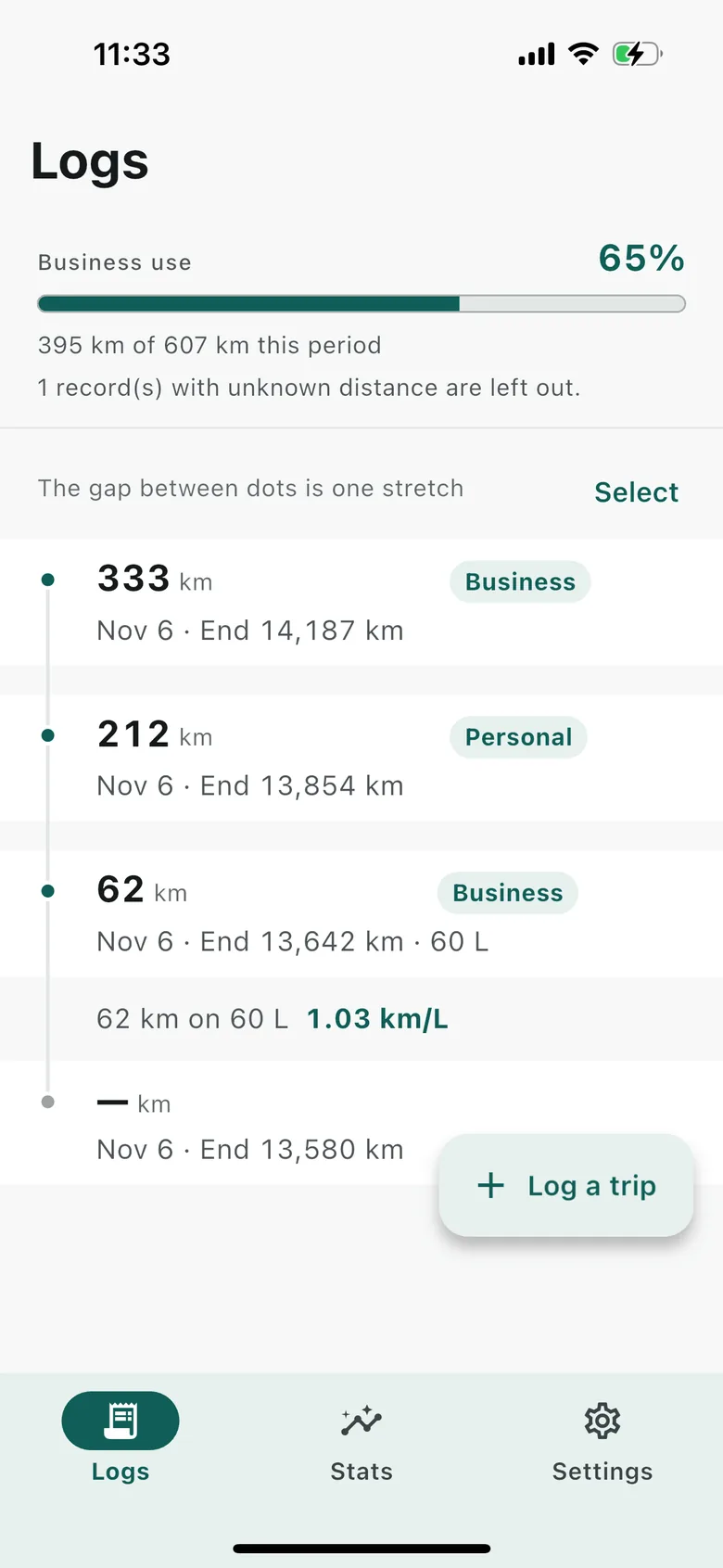
Nothing is picked up by GPS. You read the odometer and you type it in. In return, what you typed stays as you typed it, and you can always see where your business-use ratio came from.
Download on the App StoreiPhone · iPad · Free to keep records · In-app purchase available
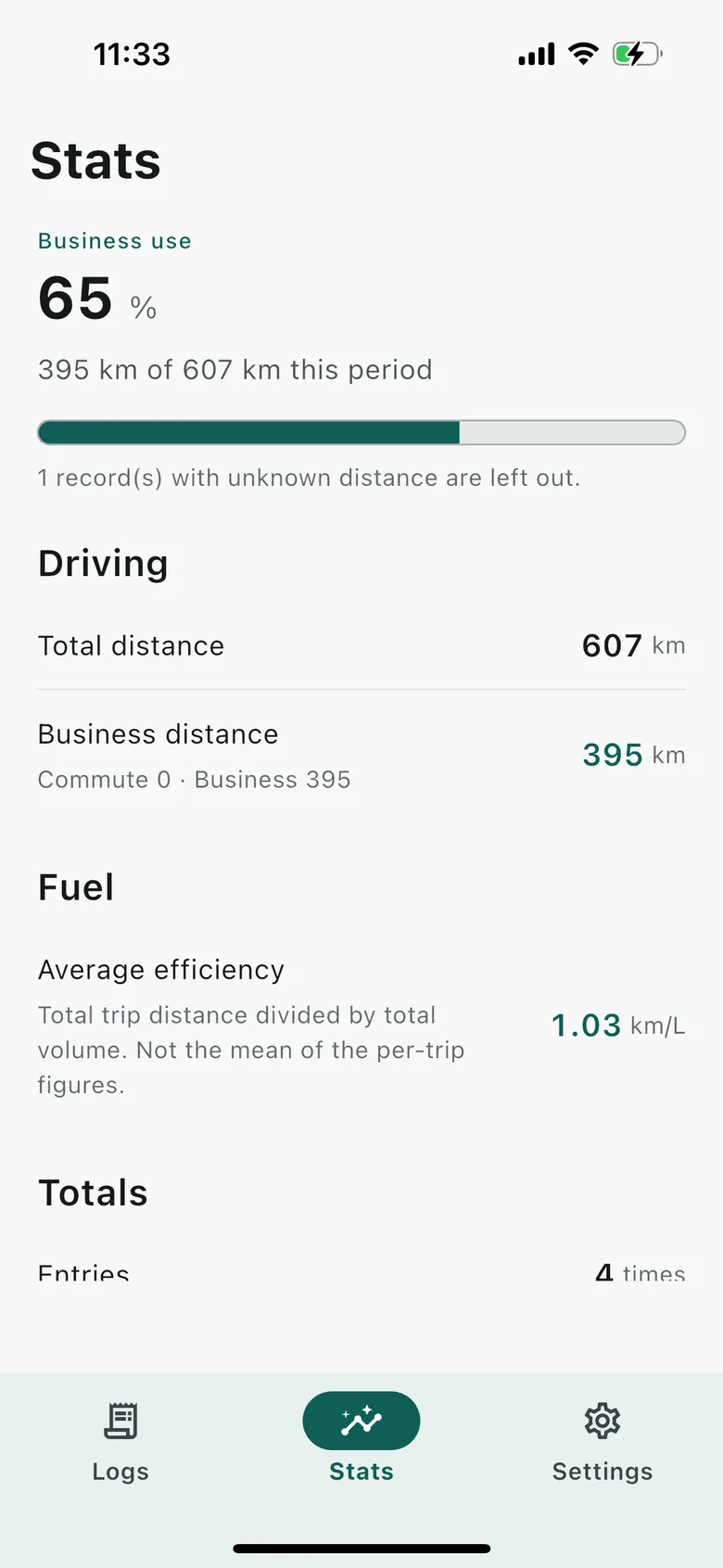
- ⑪ Total distance
- 1,284 km
- ⑫ Business distance
- 1,041 km
- ⑬ Business-use ratio
- 81.1 %
2 records with no distance are left out. They are not counted as zero.
Korean, English and Japanese. Light, dark or system appearance.
The app does not invent numbers
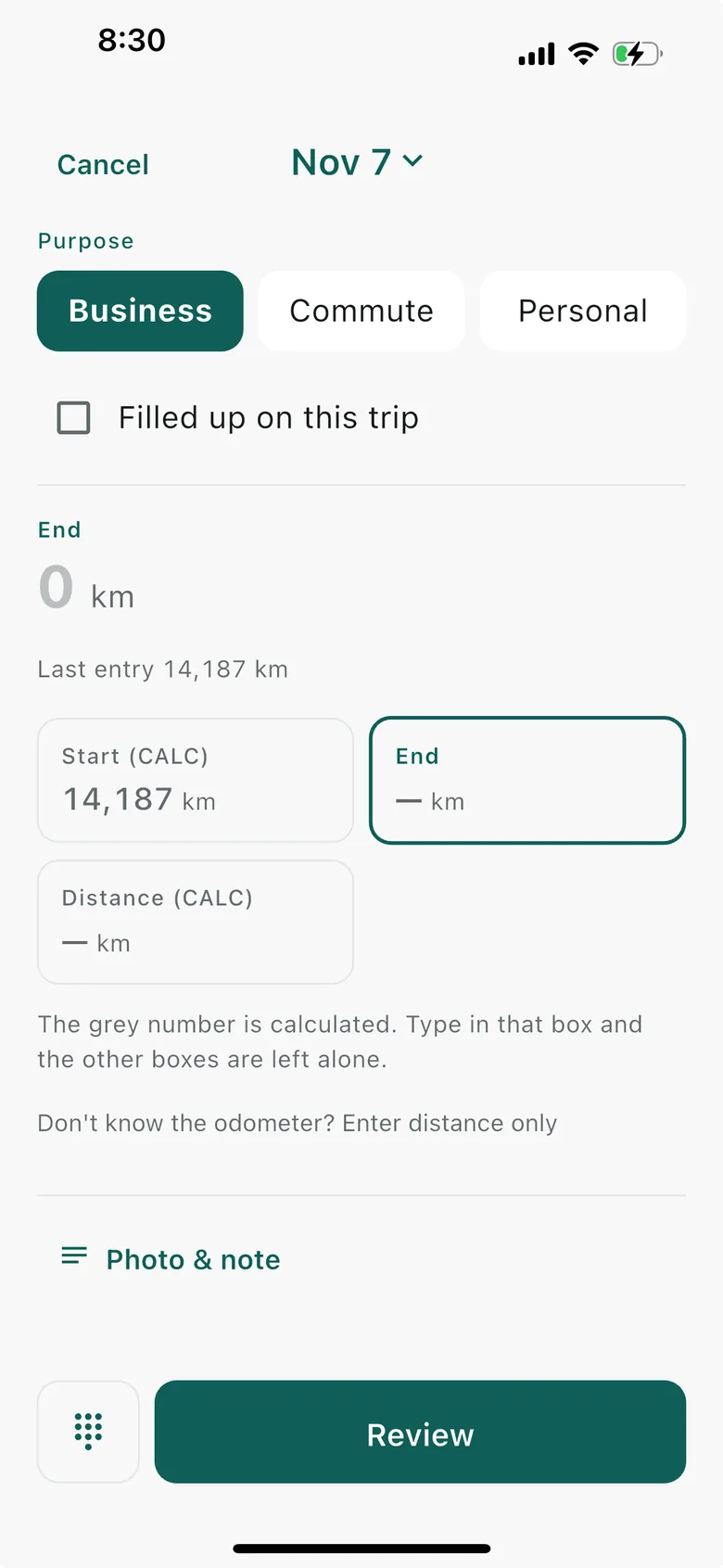
What you type is stored as typed. Anything the app worked out turns grey and is labelled "computed", so you can see on screen where your own figures end.
Korea's NTS form, unchanged
Fields ① vehicle type through ⑬ business-use ratio, in the order the official form has them. No field renamed, none added.
The ratio is always in view
Field ⑬ sits at the top of the records tab for the current tax year. You know the figure now, not when the filing deadline arrives.
Three screens, no more
Logs, stats, settings. No room was made for anything else.
The form's own fields,
as they are
The app follows the driving-log form set out by Korea's National Tax Service (NTS Notice 2025-5, in force 1 April 2025).
- ① Vehicle type
- You name the vehicle
- ② Registration number
- Per vehicle
- ③ Date of use
- Today by default
- ④ User
- Department · name
- ⑤ Odometer before
- Carried over from the last record
- ⑥ Odometer after
- You type it
- ⑦ Distance
- ⑥ − ⑤
- ⑧ Commute
- Chosen as the purpose
- ⑨ General business
- Chosen as the purpose
- ⑩ Note
- Optional
- ⑪ Total distance
- Tax-year total
- ⑫ Business distance
- ⑧ + ⑨
- ⑬ Business-use ratio
- ⑫ ÷ ⑪
- The odometer-before comes from your last record It is filled in grey from field ⑥ of the previous entry. Touch it once and the app stops overwriting it from then on.
- Private trips land in ⑦ only The three purposes are commute, general business and private. The form has no column for private use, so it counts towards ⑦ and is left out of ⑧ and ⑨. Nothing is slipped in to push the ratio up.
- "Distance only" mode If you missed the odometer, type field ⑦ by itself. Instruction 7 of the notice allows it — record ⑥ − ⑤ for each trip, or the sum of distances per user.
- The form header is entirely optional Business name, business registration number, department, user's name. The app works without any of them, and anything left blank is marked "not entered" in a colour you cannot miss, so you never export a header you thought was filled in.
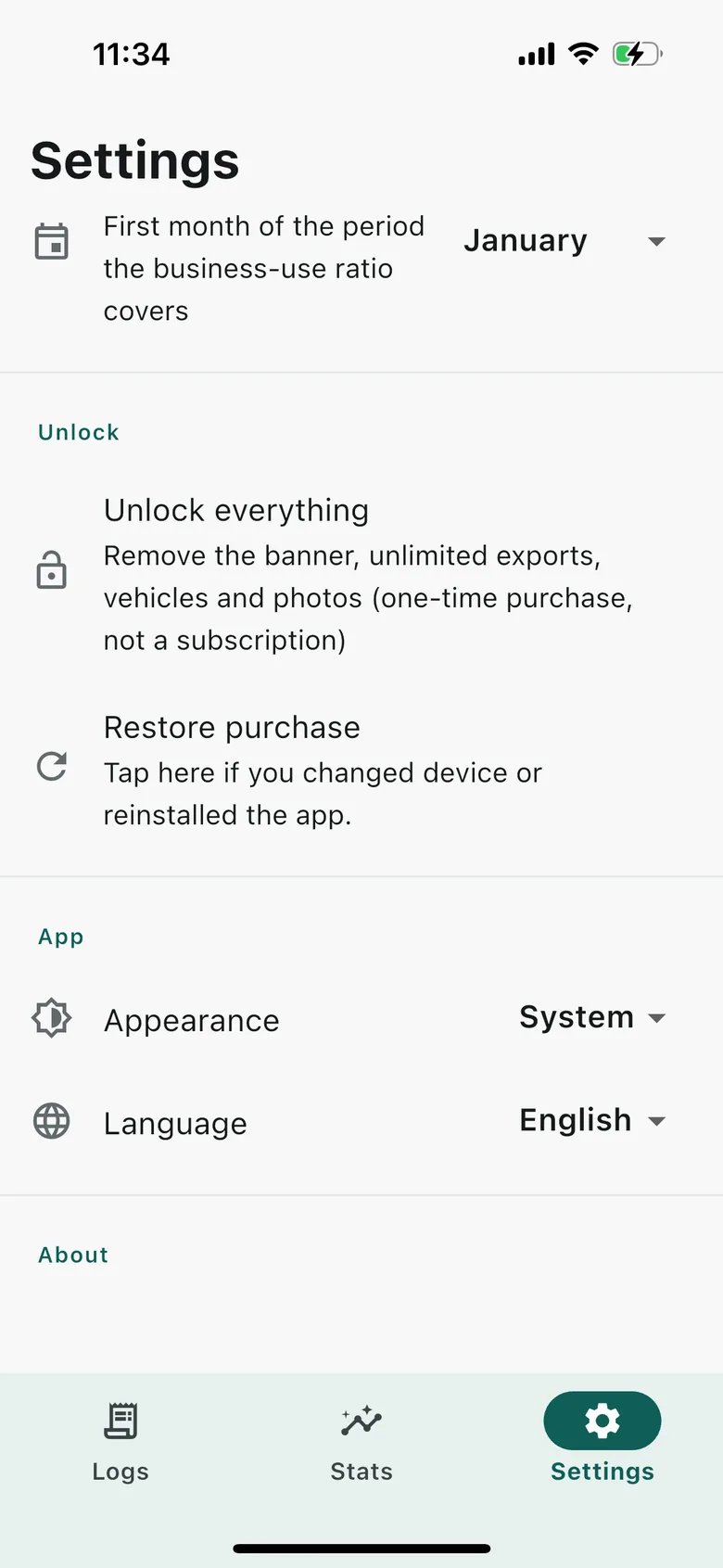
- You choose the first month of the tax year January through December, so fields ⑪⑫⑬ group over the right period even when your year does not start in January.
The ratio is not
forced into shape
This figure goes into an expense claim, so filling a gap with a plausible number is the most dangerous thing the app could do.
- Records with no distance drop out of the denominator They are not counted as 0 km. They are left out of field ⑪ entirely.
- The app says how many dropped out "N records with no distance are left out" sits next to the ratio itself.
- No ratio shows as —, never 0% With no records, or no distances at all, 0% would be a wrong answer. The app leaves it empty instead.
What you type
does not shift
On a day you also log fuel, fill in two of amount paid, unit price and volume and the app works out the third. Fill in all three and it touches nothing.
With a card discount, the amount paid will not match unit price × volume, and that is normal. The app neither corrects it nor warns you. Before saving, it shows your figures back to you once more.
Fuel follows only
the days you ask for it
The fuel fields open only on records where you tap [Filled up on this trip]. Leave it alone and the word "fuel" appears nowhere in the app. A driving log does not come with a fuel log attached.
- Six fuel types Premium petrol, regular petrol, diesel, LPG, electric and hydrogen. The unit changes with the type — litres, kWh or kg.
- Per-leg and average efficiency The average is weighted by distance. Per-leg figures are not simply added up and divided.
- Reset the average For when one forgotten odometer reading has wrecked the average. No record is deleted, and the reset can be undone.
- You type the station name Or pick one you have used recently. Without location permission, the wrong station is never filled in for you.
One CSV stands
as the log itself
The notice accepts a separate layout as long as it carries the vehicle type, registration number, date of use, user and trip details. The exported file carries all of them.
- 23 columns Form fields ① to ⑩ in order, the fuel figures, and columns the app can read back in.
- Opens straight in Excel Korean text is not mangled. Nothing to tidy up before you hand it to whoever does your tax.
- The file goes only where you send it You pick the app — mail, messenger, files. The app sends it nowhere by itself.
What it does not do
These are left out on purpose. There is no plan to add them later.
- It does not ask for location permission Trips are not detected for you. The app has no idea where you went.
- It does not use Bluetooth No pairing with the car to notice the engine starting, either.
- It does not run in the background While the app is closed it does nothing at all, and uses no battery.
- There is no server and no account Nothing to sign in to, and no server outage that can keep you from your own records.
- No garage bookings, quotes, broking or resale values It stays a thing you write in.
The weakness goes here too. With no server, losing the device leaves you nothing but your CSV files. A driving log has to be kept for years, so export at the end of every tax year and keep that file somewhere else.
Editing and
deleting records
- Photos
- Receipt · odometer
- Note (⑩)
- Optional
- Bulk delete
- Select several, delete once
- Vehicles
- Several · reorderable
Deleting a vehicle deletes its records and photos with it. The app tells you so first.
Recording, editing, deleting
and the ratio stay free
Keeping the log and working out the ratio cost nothing, and will not be put behind a price later.
Free 0
- Unlimited records — add, edit, delete
- Business-use ratio · tax-year setting
- 1 vehicle — one ad adds another, permanently
- 1 photo per record — one ad adds another to that record
- CSV export — one ad per export
- Banner at the bottom of the list and stats screens
Unlock everything one payment
- Not a subscription. Buy it once and that is it
- Unlimited CSV exports
- Unlimited vehicles · unlimited photos
- Banner removed
- Restore purchase sits in Settings
When no ad can be fetched, the feature opens anyway. This is not an app you have to watch ads to use.
Available now
iOS 15.0 or later · iPhone · iPad. Every record is stored on the device alone. No account, no server, no location permission.
Download on the App StoreiPhone · iPad · Free to keep records · In-app purchase available